
Wishwin login takes a few seconds: click the LOG IN button in the top-right corner of wishwin.com, enter the email and password used at registration and press LOG IN. The same credentials work on desktop and in any mobile browser on iOS or Android, and a forgotten password can be reset through the "Forgot your password?" link right inside the login window. After signing in, Australian players get access to their AUD balance, the cashier, active bonuses, weekly challenges, the coin Shop and VIP progress.
The login form opens as a pop-up over the current page, so the player stays in the same section of the site after sign-in. Account access is protected by SSL encryption, and withdrawals additionally require identity verification. This page covers the sign-in steps, password recovery, typical errors and what becomes available once the account is open.
The key details of the Wishwin sign in process are collected in the table.
| Login essentials | Details |
|---|---|
| Where to log in | LOG IN button, top-right corner of wishwin.com |
| Login method | Email address + password |
| Password visibility | Show/hide toggle inside the password field |
| Password reset | "Forgot your password?" link in the login window |
| Device support | Desktop and mobile browsers, no app download needed |
| Session security | SSL encryption on all pages |
| When verification appears | Before the first withdrawal or on request from the security team |
| Currency | AUD |
| Support | 24/7 live chat and Help Centre |
How to log in to Wishwin
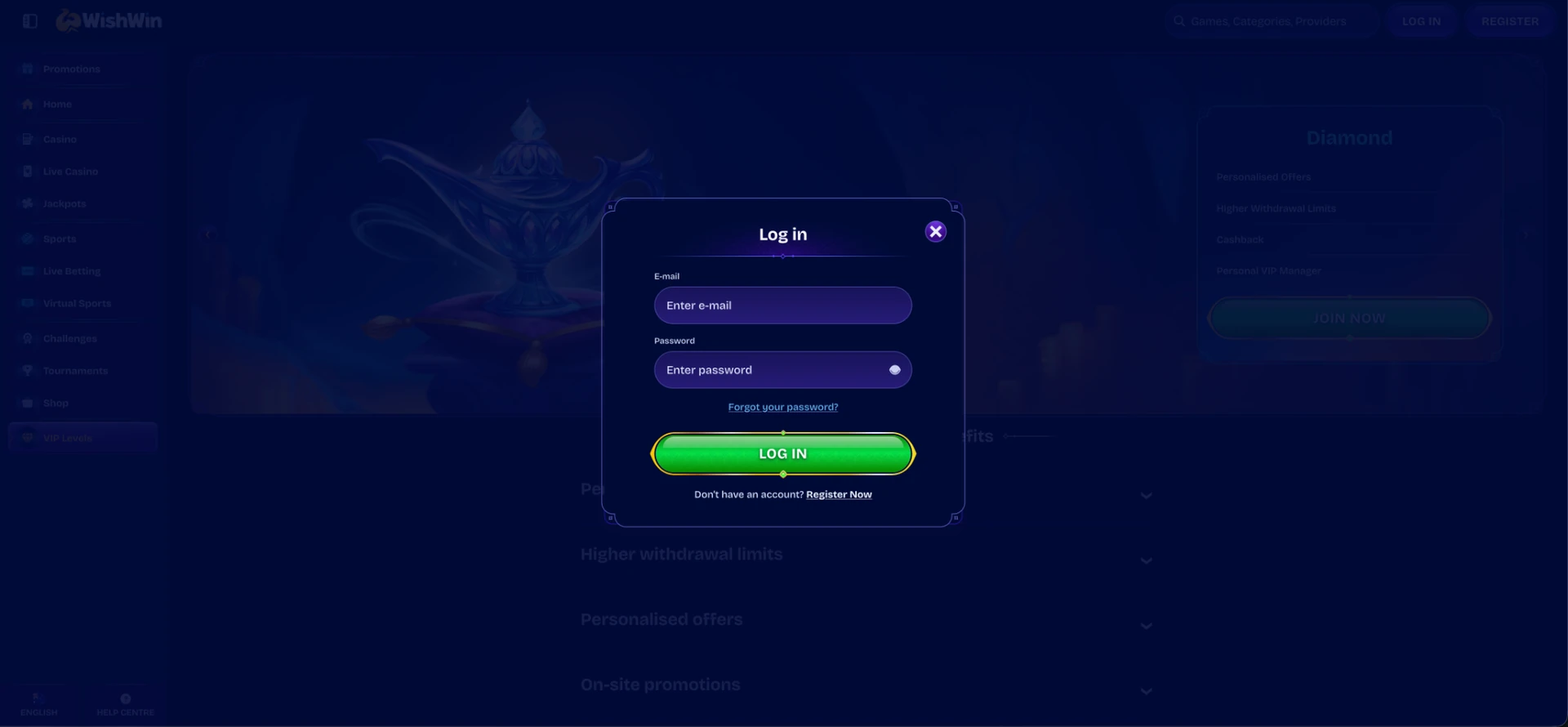
The Wishwin login window is the same on every page of the site, whether it is opened from the homepage, the promotions page or a game. Once the player signs in, the site keeps them on the section they were browsing.
Step-by-step login
The whole process takes six short actions:
- Open wishwin.com in a browser on a computer, tablet or phone.
- Click the LOG IN button next to REGISTER in the top-right corner.
- Enter the email address used during registration in the E-mail field.
- Type the password in the Password field - it is case-sensitive, and the eye icon shows the characters to check for typos.
- Click the green LOG IN button at the bottom of the form.
- Wait for the header to show the balance and the deposit button - this confirms the account is open.
No account yet? Create one first
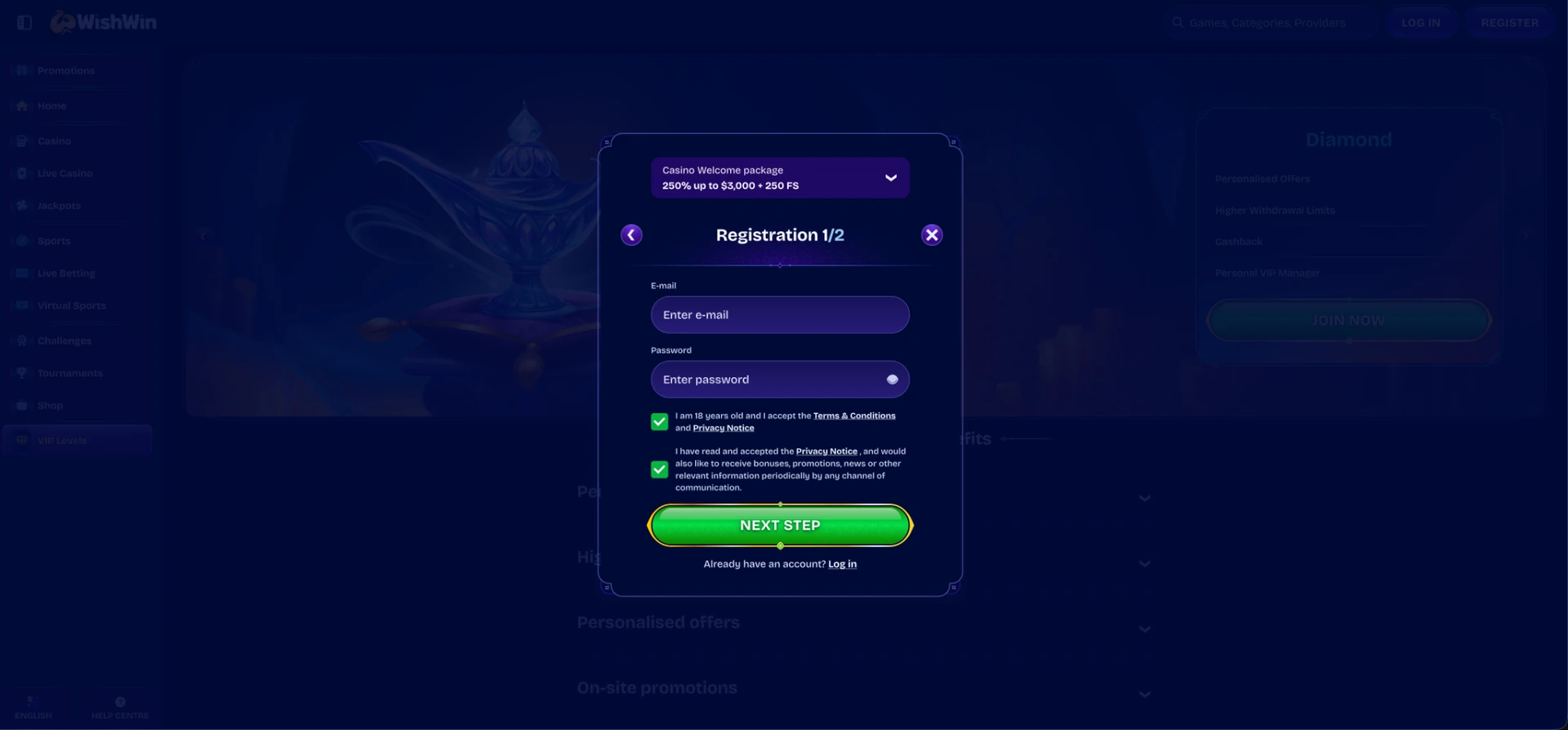
The login window includes a "Don't have an account? Register Now" link at the bottom. It switches the form to registration without closing the pop-up, so new players can create an account in the same place.
Quick registration flow
Registration at Wishwin is split into two steps and starts with the same two fields used later for login:
- Choose the welcome offer in the drop-down at the top - the casino package of 250% up to AUD 3,000 + 250 FS or the sports first deposit bonus of 100% up to AUD 150.
- Enter an email address and create a password.
- Confirm you are 18 or older and accept the Terms & Conditions.
- Click NEXT STEP and complete the profile in step two.
The email and password chosen here become the Wishwin login credentials, so it makes sense to use an address with regular access, since password resets are sent there.
Secure login practices
Account security depends on both the casino and the player. The platform encrypts the connection and verifies identity before payouts, while a few habits on the player's side keep the account protected:
- Use a unique password for Wishwin that is not shared with email or other sites.
- Combine upper and lower case letters, numbers and symbols, with at least 10 characters.
- Check that the address bar shows wishwin.com and a padlock before entering credentials.
- Avoid signing in on public or shared computers, and log out after each session on devices other people use.
- Do not save the password in browsers on shared devices.
- Ignore messages asking for login details - support never asks for a password in chat or email.
Wishwin password recovery
A forgotten password does not block access to the account for long. The recovery link sits directly under the password field in the login window, so there is no need to contact support for a standard reset.
Reset steps
The reset takes a few minutes and requires access to the email linked to the account:
- Click LOG IN in the top-right corner.
- Select Forgot your password? under the password field.
- Enter the email address registered on the account and submit the request.
- Open the reset email and follow the link inside. If the email does not appear within a few minutes, check the spam and promotions folders.
- Create a new password and confirm it.
- Return to the login window and sign in with the new password.
If the email address itself is no longer accessible, the reset has to go through live chat, where the support team confirms ownership of the account before updating the details.
Wishwin mobile login
On phones and tablets, Wishwin login works in the browser exactly as on desktop. The sidebar collapses into a compact icon menu, while the LOG IN and REGISTER buttons remain visible in the header.
Tips for mobile
A few settings make signing in on a phone faster and more reliable:
- Add a home screen shortcut through Safari's Share menu on iPhone or the Chrome menu on Android to open the site in one tap.
- Let the phone's password manager save the credentials on a personal device protected by Face ID, fingerprint or PIN.
- Keep the browser updated - outdated versions can fail to load the login pop-up correctly.
- Switch between Wi-Fi and mobile data if the login window hangs on a slow connection.
Troubleshooting common Wishwin login errors
Most sign-in problems have a simple cause and can be fixed in a minute. The most frequent situations are listed below.
Incorrect email or password
An error message after pressing LOG IN usually means a typo or the wrong email. The following checks solve most cases:
- Use the eye icon to display the password and check each character.
- Make sure Caps Lock is off and the keyboard language is English.
- Remove any space accidentally copied before or after the email address.
- Try other email addresses if several are in use, then reset the password if nothing matches.
Browser or cache issues
If the login form does not open, does not respond or closes without signing in, the browser is often the reason:
- Clear cache and cookies for the site, then reload the page.
- Disable ad blockers or script-blocking extensions for wishwin.com.
- Open the site in another browser such as Chrome, Safari or Firefox.
- Try a private or incognito window to rule out saved data conflicts.
The site does not open
Access issues that appear before the login form even loads are usually related to the network or to a domain being unavailable in a particular region. In this case, checking the connection, restarting the router or switching to mobile data helps, and live chat can confirm the current working address.
Account blocked or restricted
An account can be locked after several failed login attempts, during a security check or if a self-exclusion or cooling-off period is active. The message shown on screen usually explains the reason. In all of these cases, live chat is the fastest route to restore access, and the support team may request identity documents to confirm ownership.
What you access after Wishwin login
Once signed in, the account opens every section of the platform and links them to one AUD balance. The main areas available to logged-in players are:
- Cashier - deposits from AUD 20 and withdrawals from AUD 15, depending on the method.
- Casino lobby - 10,000+ pokies, jackpot games, table games and instant games in real-money mode.
- Live Casino - nearly 900 live tables, including the Gold Saloon series.
- Sports and Live Betting - the sportsbook with Boosted Odds, Prebuilds and a booking code field.
- Promotions - welcome package, reloads, cashback and tournaments.
- Challenges - weekly casino and sport tasks with coin rewards.
- Shop - exchange of coins for bonus money, free spins and free bets.
- VIP Levels - current level from Bronze to Diamond and available benefits.
- Profile settings - personal details, password change, limits and verification.
Account verification (KYC)
Verification is not required to log in or to make a deposit, but it becomes necessary before the first withdrawal. The casino may also request documents at a later stage, for example after a large deposit or a change of payment method.
The documents usually requested for verification are:
- Photo ID: passport, driver licence or national ID card.
- Proof of address: a recent utility bill or bank statement, typically issued within the last three months.
- Proof of payment method: a photo of the card with the middle digits covered, or an image of the e-wallet account page showing the account holder name.
Uploading clear copies where all four corners are visible and the name matches the profile details helps the check go through without extra requests.
Wishwin login FAQ
Short answers to the questions players most often ask about signing in.
What do I need for Wishwin login?
Only the email address and the password set at registration. The login form has no separate username field.
Where is the Wishwin login button?
In the top-right corner of every page, next to the green REGISTER button. On mobile it stays visible in the header.
I forgot my password. What should I do?
Click LOG IN, select "Forgot your password?", enter the account email and follow the link in the reset message to set a new password.
Can I use the same login on mobile and desktop?
Yes. One Wishwin account works on all devices, and the balance, bonuses and coins are the same everywhere.
Why can't I log in to my Wishwin account?
The usual causes are a typo in the credentials, browser cache, blocked scripts or a temporary account lock. Resetting the password or contacting live chat solves most cases.
Do I need to verify my account to log in?
No. Verification is required before withdrawals, not for signing in or depositing.